Making a new release
To make a new release version, the following steps must be followed:
1. Determine the new version number
SCM Backup uses Semantic Versioning.
The new version number must be in “three-digit” MAJOR.MINOR.PATCH format, for example 1.0.0 !!
2. Prepare a blog post
Here are the posts, write a new one with the list of changes.
3. Release the application
Each push to master creates a new CI build on AppVeyor anyway.
Create a new release by creating a Git tag in the main repository with the new version number.
The CI build will recognize this and automatically use this version number to create a new GitHub release.
Note
Don’t forget to actually push the tag! Git doesn’t do this automatically.
From the command line, it’s
git push origin 1.0.0.In Git GUI, you need to set this checkbox when pushing:
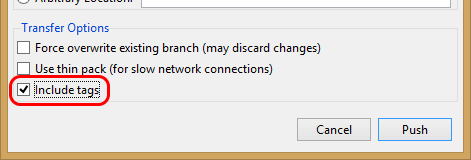
Edit the release on GitHub and paste into the description:
the following Markdown to show an image with the download count:
the list of changes from the blog post
4. Release the docs
Set the version and release numbers in the Sphinx configuration file
conf.pyto the new version number.Set
versionto the shortX.Yformat, e.g.1.0.Set
releaseto the full three-digit format determined in step 1, e.g.1.0.0.Apparently Read the Docs uses this number at least in the automatically created PDF.
Create a new Git tag (like in the main repository) in the documentation repository as well, but in the short X.Y format.
This will create a version of the documentation for this release, making use of Read the Docs’ versioning capabilities.
5. Publish the blog post
Period.