Bitbucket
Configuration settings for backing up repositories from Bitbucket.
Warning
Known limitations:
Issues are not backed up
- SCM Backup supports Bitbucket Cloud (see Hosting Options) only, the self-hosted options are not supported!
⇒ see Why doesn’t SCM Backup support backing up local installations of [hoster X]?
Sources
For the basics, please read the Sources section first.
For Bitbucket, the hoster entry in the config file needs to look like this:
hoster: bitbucket
SCM Backup will always backup a Bitbucket Workspace.
Bitbucket repository URLs look like this: https://bitbucket.org/WORKSPACEID/REPO/…so the URL part directly behind https://bitbucket.org is the workspace ID.
To backup the repos of any workspace, the
nameentry in the config needs to be set to the workspace IDThe
typeproperty of the source doesn’t matter anymore (because for what SCM Backup does, there’s no difference between users and workspaces), so SCM Backup will accept eitheruserororg
Authentication
Without authentication, SCM Backup can only backup your public repositories.
In this case, it shows a warning:

To backup your private repositories as well, you need to authenticate with a user who has sufficient permissions to the workspace’s repositories.
Create an app password for SCM Backup for that user:
In the user’s settings on Bitbucket, go to the App passwords area (
https://bitbucket.org/account/user/YOUR-USERNAME/app-passwords) and create a new app password. Give it at least the following permissions: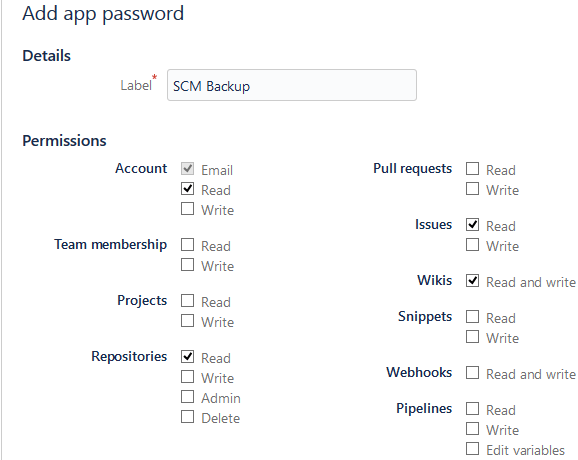
Account: Read
Repositories: Read
Issues: Read
Wikis: Read and write (SCM Backup only needs to read, but there’s no separate “just read” permission)
Put the username and the app password into the
authNameandpasswordproperties of the source in the config file.Note
By default, a user’s workspace ID is equal to the user name, but it’s possible to change the workspace ID, so workspace ID and user name don’t match anymore.
In this case, you need to set
nameto the workspace ID andauthNameto the user name.Example:
sources:

  - title: some_title
    hoster: bitbucket
    type: org
    name: your_workspace
    authName: your_user_name
    password: your_app_password
This will backup the repositories of the workspace
your_workspace, but authenticate with the useryour_user_nameand the app password.